Blockchain explorer pages organize public ledger data into address, transaction, token, and contract views—so readers can interpret balances, transfers, internal calls, and verified source without treating ticker names as identity.
This explainer extends What is a blockchain explorer for users who already know the search box exists and need field-level literacy. Bitcoin-oriented explorers emphasize UTXOs; Ethereum-family explorers such as Etherscan and BscScan emphasize accounts, tokens, and contracts—see Etherscan vs BscScan vs Blockchain.com for tool choice. Before trusting any single summary line, learn what each page can answer. The same discipline applies throughout: full identifiers, correct network, nested tabs, then confirmation depth. Confirm you are on the expected domain before you paste a TXID.
| Page type |
Core question it answers |
| Transaction |
Did this hash succeed, and what moved? |
| Address |
What did this account do over time? |
| Token |
How do transfers of this contract asset appear? |
| Contract |
What code and read methods are published for this address? |
| Block |
Which transactions landed in this height? |
Searching by block number, transaction hash, or address string is the shared entry point across explorers. A Bitcoin block explorer is the Bitcoin-focused instance of the same pattern: indexed UTXO history you can query without running a node. In one sentence: paste a TXID, address, or block height into the matching chain’s search box, open the detail page, then read every tab that could hide token or internal value movement. Multi-chain products work the same way—switch the network index first—because a valid Ethereum hash will not resolve on a Bitcoin-only view. Analytics layers sit on top of those indexes; start with the raw pages before charts.
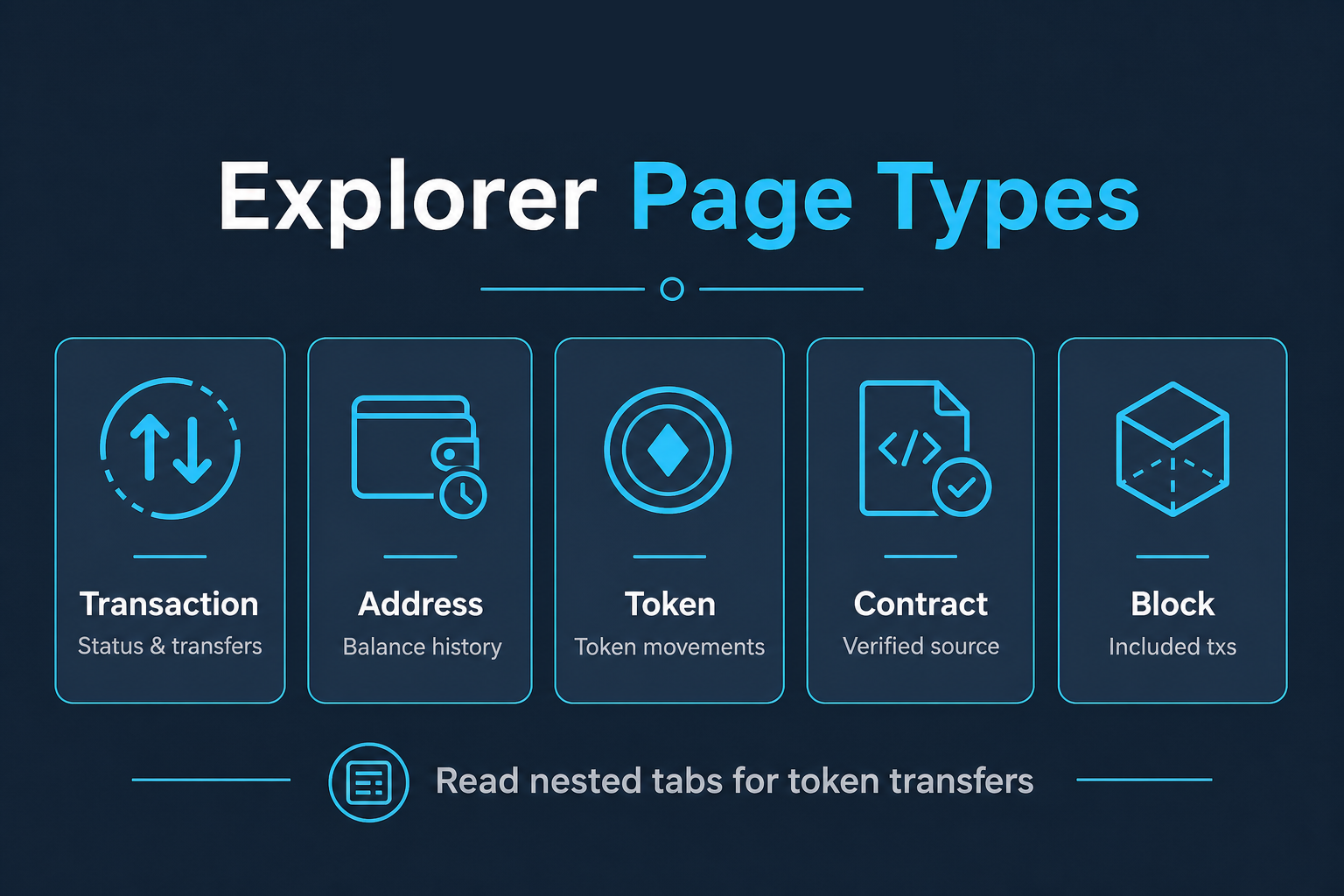 Figure 1. Page types map to different verification questions—start with the right view.
What Does an Address Page Show?
Bitcoin and Account-Model Addresses
An address page lists a balance view and a history of incoming and outgoing transfers for a public address. On account-model chains, the balance is an account state; on UTXO chains, explorers present spendable outputs and aggregated views. Labels and name tags—when present—are community or operator annotations, not cryptographic proof of identity. Paste the address, then read outputs and incoming payments carefully. On smart-contract chains, the UI may also list token holdings beside the native balance.
Treat address pages as activity logs. Large balances or frequent transfers do not imply legitimacy. For payment checks, jump from the address row into the specific TXID and follow Verify a crypto transfer step by step. Finding a receive address in a wallet is separate from finding a transaction ID after a send—use the address page mainly when the TXID is missing.
Wallet Address Checks
Always verify the full string rather than a truncated preview. Address poisoning attacks rely on similar prefixes; match every character against the intended destination before you conclude funds moved correctly. When a client says “sent” and you are tracking payment, the address history is a fallback view—prefer the TXID page when you have it, then confirm the matching outgoing row on the sender address if amounts still look ambiguous.
What Do Token Pages and Token Transfers Mean?
Token pages describe a contract-based asset: symbol, decimals, holders, and transfer lists. A token transfer row shows movement of that contract’s units, which may appear alongside a separate native-coin fee paid to process the transaction. Beginners often misread the native fee as the payment amount. Open the token-transfer section whenever the top-line native amount looks too small to be the payment you expected.
Always identify tokens by contract address. Symbols can be copied by unrelated contracts. Explorer warnings, holder concentration, and unverified contracts are signals to slow down—not investment ratings. Native Bitcoin pages emphasize UTXOs rather than ERC-style token contracts, yet the habit of reading nested details still applies when wrapping assets or using multi-asset interfaces. Do not skip the token tab just because an analytics chart looks complete.
What Is a Contract Page, and What Does “Verified” Mean?
A contract page represents a smart-contract address. When source code is verified, the explorer displays human-readable code and often a Read/Write contract interface that matches published ABI methods. Unverified contracts still exist on-chain; the explorer simply lacks matching source. Bitcoin’s base layer has no EVM-style contract page, so Bitcoin-focused explorers emphasize transactions, addresses, and blocks, while smart-contract chains add this contract view on top of the same search pattern.
Verification improves auditability of what the UI claims the bytecode implements, but it does not guarantee safety, economic design quality, or honest off-chain promises. Write methods still require a wallet signature and can move assets if approved. Treat contract verification as transparency tooling—not as a substitute for independent checks of permissions, upgrade keys, or external oracles. Marketing write-ups are also not a substitute for reading verified source and admin roles on the contract page.
What Are Internal Transactions—and Why Do Confirmations Matter?
Internal transactions (also described as internal calls in some UIs) represent value movements triggered by smart-contract execution rather than a simple externally owned account transfer. A parent transaction can succeed while important value moves appear only in the internal or token-transfer sections.
When a deposit seems “missing” despite a success status, open token transfers and internal calls before concluding failure. Contract routers, bridges, and exchange deposit contracts frequently use these paths.
Confirmations are additional block depth after inclusion. Explorers show confirmation counts so readers can judge settlement confidence beyond a single “success” flag: later blocks make reversing that inclusion increasingly costly, so counterparties often wait for a stated confirmation count before marking funds usable.
Common Misreadings and How to Avoid Them
| Misreading |
Better check |
| Trusting the ticker symbol |
Match the contract address from a trusted listing |
| Reading only native value |
Open token-transfer and internal-call tabs |
| Assuming name tags equal KYC identity |
Treat tags as optional labels |
| Confusing pending with failed |
Confirm final status and block inclusion |
| Using the wrong chain’s explorer |
Reselect network before deeper analysis |
These mistakes produce false confidence. Methodical reading—hash, network, token contract, then nested transfer tabs—keeps verification grounded in ledger facts. Search accurately, read every relevant tab, and separate wallet UI claims from on-chain rows. Before you accept a deposit as final, re-check the destination address character by character, open any token-transfer or internal-call section, and note confirmation depth against the receiving platform’s published rule.
If two indexers briefly disagree after a fresh inclusion, wait for another block and refresh—ledger inclusion matters more than a single delayed UI. For a simple Bitcoin payment check: locate the transaction ID from the sending wallet, paste it into a Bitcoin-capable explorer, confirm outputs, then wait for the confirmation count your counterparty requires. Supported explorers vary by asset; privacy-focused search products may minimize logging, yet the ledger itself remains public. Reading checklist (not a product ranking): correct chain, full identifier, nested tabs, then confirmations.
Key Takeaways
Explorer data is structured by page type: transactions for a single event, addresses for histories, tokens for contract assets, contracts for code and methods, and internals for contract-driven value flow. Symbols are weak identifiers; contract addresses and nested transfer views are strong ones. Literacy on these pages turns a blockchain explorer from a search box into a reliable verification surface. Finding a transaction ID, performing an address lookup, and reading confirmation depth are the same discipline applied across screens.
FAQ
Can anyone see my wallet balance on a blockchain explorer?
On transparent public chains, yes—anyone with the public address can usually view on-chain balances and transfers. That does not automatically reveal the owner’s legal name. Privacy settings on analytics products do not change the public nature of address pages. Bitcoin address lookups and smart-contract address pages both expose public history; the difference is account model and whether token holdings appear beside native balance.
What is the difference between a token transfer and a normal transaction?
A transaction is the signed envelope included in a block; a token transfer is an event or state change for a token contract that may occur inside that transaction. Both can appear on the same explorer page in different sections. Always open token details when the native amount looks too small. For deposits, confirm the token contract row, then confirm the destination address and confirmation depth.
Does verified contract source mean a project is safe?
No. Verification means the published source matches bytecode on the explorer’s verification pipeline. It does not certify economics, permissions, or off-chain claims. Pair source checks with separate review of admin roles and upgrade paths. Third-party marketing write-ups cannot replace that on-page contract reading.
Why do I see a tiny ETH/BNB amount when I sent tokens?
That small native amount is often the gas fee or a related native movement, while the token amount appears in the token-transfer list. Open the token tab to confirm the asset you intended to move. The same habit applies on multi-asset interfaces that mix native and token-like rows. If you still cannot match the payment, return to the full TXID page rather than relying on an address summary alone.