A stop-loss order for buying US stocks on Gate is used to plan how a position may be reduced or closed if the price moves against the user’s expectation. Stop-profit, also called take-profit, sets a planned exit when the price reaches a target level. These tools can support risk control, but they do not remove market risk, slippage, spread, liquidity limits, or product-specific execution rules.
Gate’s US stock access uses USDT as the funding and settlement asset for supported U.S. stocks and ETFs. However, order controls may differ between Gate Stocks spot trading, stock contracts, CFDs, and other stock-linked products. Before placing any risk-control order, users should confirm the available order types in the live order screen and check the latest Gate product rules.
A stop-loss order for buying US stocks on Gate refers to a preset exit condition that may help reduce or close a stock position if the market reaches a selected trigger level, subject to the product’s supported order types and execution rules.
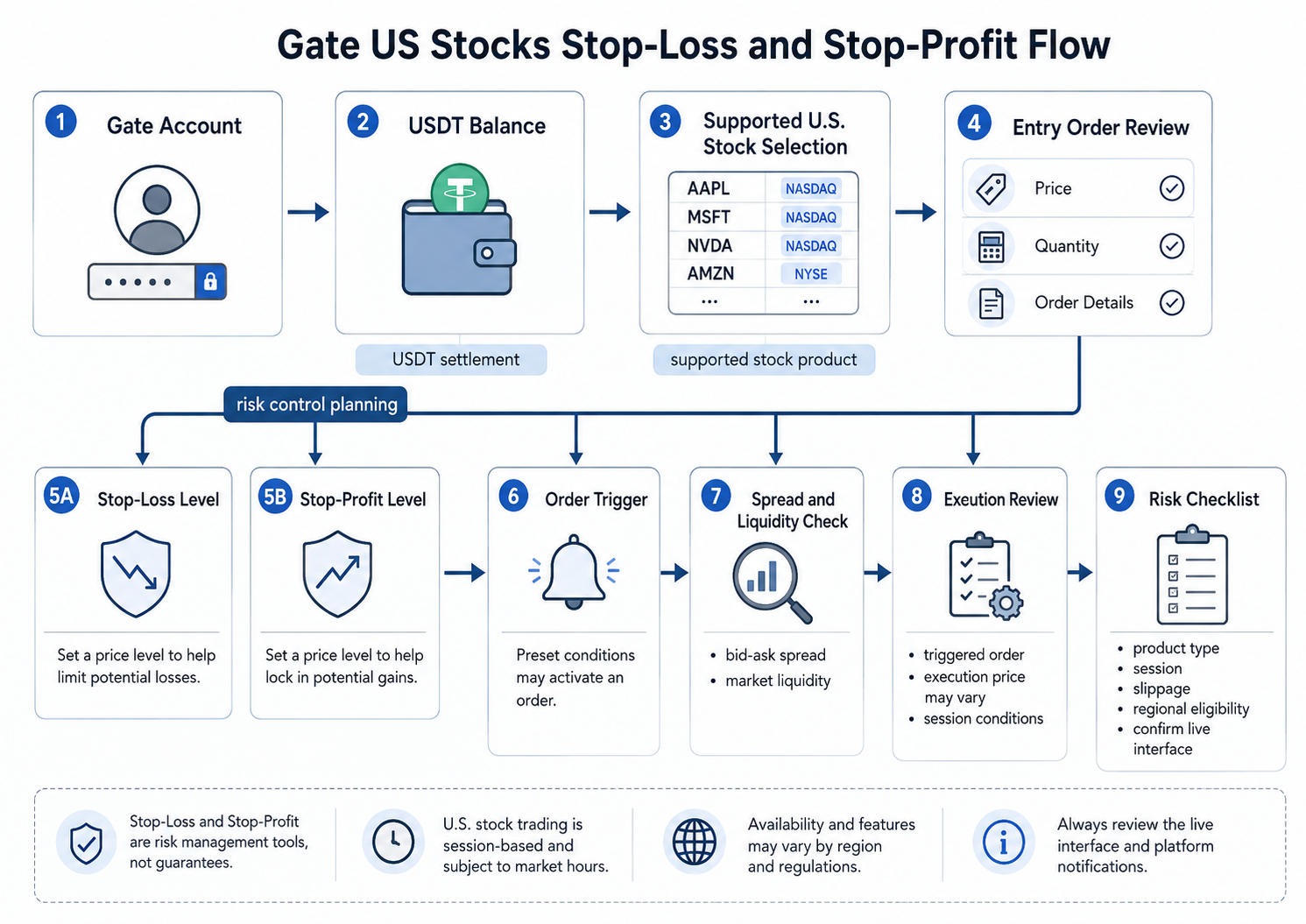
What Does a Stop-Loss Order for Buying US Stocks on Gate Mean?
A stop-loss order for buying US stocks on Gate means setting a predefined risk level before or after entering a supported stock or ETF position, if the selected product interface supports this function. The goal is not to predict the market. The goal is to decide in advance where the user no longer wants to keep the same exposure.
For example, a user may buy a supported U.S. stock with USDT and decide that if the price falls to a certain level, the position should be reduced or closed. In a supported order interface, that level may be entered as a trigger price or condition. Once triggered, the system may place an exit order according to the selected order type, price, and quantity.
The key point is that a stop-loss is not a guaranteed exit at the exact trigger price. A trigger price activates the order condition. The final execution depends on available liquidity, spread, market movement, order type, product rules, and whether the market is open for that product.
A simple analogy helps. A stop-loss is like setting a fire alarm in a building. The alarm can warn you when danger reaches a set level, but it does not guarantee that everyone exits instantly through the same door at the same speed. Market liquidity, order depth, and session timing still affect the exit.
Users still learning the basic funding process should first review how U.S. stock trading with USDT works before focusing on stop-loss settings.
How Do Stop-Loss and Stop-Profit Work in Risk Control?
Stop-loss and stop-profit are two sides of the same planning process. A stop-loss defines a downside exit condition. A stop-profit defines an upside exit condition. Together, they help users think about risk before emotions take over.
| Risk-Control Tool |
Main Purpose |
Practical Use |
Key Limitation |
| Stop-loss |
Reduce downside exposure |
Exit if price reaches a selected lower level |
Execution may differ from trigger price |
| Stop-profit |
Lock in planned gains |
Exit if price reaches a selected upper level |
Price may continue moving after exit |
| Limit order |
Control acceptable price |
Buy or sell only at selected price or better |
Order may not fill |
| Manual exit |
User decides in real time |
Useful when automatic controls are unavailable |
Requires active monitoring |
This table shows why stop-loss and stop-profit are not only order buttons. They are part of a risk plan. The user should know the entry level, position size, acceptable loss range, target exit area, and product rules before confirming an order.
In practice, stop-loss planning is closely connected to liquidity. A thin order book may cause the final execution price to differ from the expected level. Users should review Gate US stock liquidity and spread because spread and slippage can affect both stop-loss and stop-profit outcomes.
How Can Users Set a Stop-Loss Order for Buying US Stocks on Gate?
Users can set a stop-loss order for buying US stocks on Gate only when the selected product and order interface support stop, conditional, TP/SL, or similar exit controls. The exact wording may vary by app version, region, account type, and product category.
A cautious operational flow looks like this:
-
Open Gate and enter the stock-related product area.
-
Confirm whether the product is Gate Stocks spot, a stock contract, a CFD, or another stock-linked product.
-
Select the supported U.S. stock or ETF.
-
Review the live quote, bid-ask spread, estimated USDT cost, and available session.
-
Place or review the entry order.
-
Check whether the order panel or position page supports stop-loss, stop-profit, TP/SL, stop order, conditional order, or similar controls.
-
Enter the trigger price, order price if required, order quantity, and exit direction.
-
Confirm the estimated effect before submitting.
-
Recheck open orders or position records after submission.
If the live interface does not show a supported stop-loss or stop-profit feature for the selected Gate Stocks spot product, users should not assume the feature is available. In that case, risk control may rely on smaller position sizing, limit orders where available, price alerts, manual selling, and regular position review.
This distinction matters because Gate stock spot access and derivative products do not work the same way. Users comparing product mechanics should separate US stock spot vs futures on Gate before choosing an order method.
What Should Users Check Before Setting a Stop-Loss Order for Buying US Stocks on Gate?
A stop-loss order for buying US stocks on Gate should be checked against product type, trading session, liquidity, order quantity, and the user’s own risk tolerance. The order is only as useful as the plan behind it.
Important checks include:
-
Product type: Confirm whether the position is stock spot, CFD, contract, futures, or tokenized stock exposure.
-
Position size: A stop-loss does not fix an oversized position.
-
Trigger price: The selected level should reflect a clear risk plan.
-
Order price: If a limit order is used after trigger, it may not fill.
-
Market session: Pre-market and after-hours trading may have thinner liquidity.
-
Spread: A wider bid-ask spread can affect exits.
-
Slippage: Final execution may differ from the visible price.
-
Fees and settlement: Review estimated USDT cost or proceeds.
-
Regional eligibility: Product access may vary by jurisdiction.
-
Interface status: Verify the latest controls in the actual order panel.
Trading hours matter because a stop condition during a thin session may behave differently from one during regular U.S. market hours. Users trading outside the main session should understand Gate US Stocks extended-hours trading and verify whether the selected stock is active in that session.
Price comparison also matters. A user may compare Gate’s displayed price with a public NYSE quote, but the final execution can depend on bid, ask, session, liquidity, and USDT settlement. For this reason, Gate US stock price difference is directly relevant to stop-loss planning.
What Is an Example of Stop-Loss and Stop-Profit Planning?
A typical example starts with a user planning entry, stop-loss, and stop-profit levels before the trade. Assume a user holds USDT in a Gate account and wants to buy a supported U.S. stock through Gate Stocks. The displayed estimated buy price is 100 USDT per share (equivalent), and the user plans to buy 1 share (equivalent) for a simple example.
Before confirming the order, the user defines three levels:
| Planning Item |
Example Level |
What It Means |
| Entry reference |
100 USDT |
The expected buy area |
| Stop-loss trigger |
95 USDT |
The user wants to reduce or close exposure if price falls |
| Stop-profit trigger |
110 USDT |
The user wants to reduce or close exposure if price rises |
| Maximum planned loss (before fees and slippage) |
5 USDT |
The approximate risk plan |
| Target gain (before fees and slippage) |
10 USDT |
The approximate profit-taking plan |
This example is simplified and does not include fees, tax, spread, slippage, partial fills, or fast market movement. It shows the planning logic only. The user should not treat the trigger level as a guaranteed execution price.
If the interface supports TP/SL for the selected product, the user may enter the stop-loss and stop-profit conditions after reviewing all fields. If the interface does not support automatic TP/SL for that product, the user may place a separate limit order where available, set alerts, reduce position size, or monitor manually.
The practical takeaway is simple: risk control starts before the trade. A user who decides the exit plan only after the market moves may be more likely to react emotionally.
How Are Stop-Loss Rules Different Across Gate Stock Products?
Stop-loss rules can differ because Gate offers multiple ways to access stock-linked markets. Gate Stocks spot trading, stock contracts, CFDs, futures, and tokenized products may have different order types, settlement logic, leverage, rights, trading hours, and risk controls.
| Product Type |
Typical Exposure |
Stop-Loss Relevance |
Main Risk Difference |
| Gate Stocks spot |
Supported U.S. stocks and ETFs with USDT settlement |
Check whether stop or conditional exit controls are supported in the live interface |
Market, liquidity, spread, and execution risk |
| Stock contracts or futures |
Contract-based stock price exposure |
TP/SL may be more common in contract interfaces |
Leverage, liquidation, margin, and funding risk |
| Stock CFDs |
Price-difference exposure without direct stock holding |
Stop controls may depend on CFD platform rules |
Derivative risk and possible overnight or margin costs |
| Tokenized stock products |
Token or contract linked to stock exposure |
Controls vary by product and market venue |
Token structure, issuer, liquidity, and settlement risk |
The table matters because “US stocks on Gate” is not one single product structure. A stop-loss setting that exists in a contract product should not be assumed to exist in the same form in stock spot trading. Users considering leverage should separately review Gate US stock contract leverage, because leverage can magnify losses and introduce liquidation risk.
Users comparing Gate with traditional securities accounts should also understand traditional brokers vs crypto platforms for U.S. stocks. Funding, settlement, shareholder services, transfer rules, and execution experience may differ.
Summary
A stop-loss order for buying US stocks on Gate is a risk-control tool or planning method used to define when a user may reduce or close a position if the price moves against them. Stop-profit sets the opposite type of planned exit when the price reaches a target level.
The most important rule is to verify product type first. Gate Stocks spot trading, stock contracts, CFDs, futures, and tokenized stock products may not support the same order controls. Users should confirm the actual stop-loss, stop-profit, TP/SL, conditional order, or limit order options shown in the live Gate interface before relying on them.
Stop-loss and stop-profit settings can support discipline, but they do not guarantee execution at the exact trigger price. Liquidity, spread, slippage, trading hours, order size, product rules, and regional eligibility still matter.
Stock investing involves market risk, and prices may fluctuate significantly. Please make decisions carefully based on your own risk tolerance. This article does not constitute investment advice.
FAQs
How to set a stop-loss order for buying US stocks on Gate?
How to set a stop-loss order for buying US stocks on Gate depends on whether the selected stock product supports stop, conditional, TP/SL, or similar controls in the live interface. Users should open the stock or position page, check available order types, enter the trigger price and quantity if supported, and confirm all details before submission.
Is a stop-loss order for buying US stocks on Gate guaranteed to execute at the trigger price?
A stop-loss order for buying US stocks on Gate should not be treated as a guaranteed fill at the trigger price. The trigger price may activate the exit order, but the final execution can depend on liquidity, spread, market movement, order type, and product rules.
Can I set both stop-loss and stop-profit when buying US stocks on Gate?
Users may be able to set both stop-loss and stop-profit when buying US stocks on Gate if the selected product and interface support these controls. If the feature is not shown, users should use available alternatives such as limit orders, alerts, smaller position sizing, or manual exits.
Why did my stop-loss order for buying US stocks on Gate execute at a different price?
A stop-loss order for buying US stocks on Gate may execute at a different price because the market moved after the trigger, liquidity was thin, the spread widened, or the selected order type affected execution. Extended-hours sessions and volatile news periods can make this difference more noticeable.
Does Gate Stocks spot trading use the same stop-loss rules as futures?
Gate Stocks spot trading should not be assumed to use the same stop-loss rules as futures. Futures and stock contracts often have dedicated TP/SL tools, while spot-style stock access may have different order controls depending on product rules and interface availability.
What should beginners check before using stop-loss on Gate US stocks?
Beginners should check product type, supported order controls, trigger price, order price, quantity, spread, liquidity, fees, trading session, and estimated USDT proceeds. They should also decide their risk limit before entering the position rather than after the price moves.