Qualcomm (QCOM) is a US stock listed on NASDAQ. Its ticker is QCOM, corresponding to Qualcomm Incorporated. On Gate Stocks, QCOM can be bought and sold using USDT as the funding denomination, subject to the rules shown on the platform page. To establish business structure, compute roles, and risk framing first, read the QCOM stock overview; the sections below cover only the operational path on Gate Stocks and do not repeat fundamental company analysis.
QCOM sits in semiconductors and mobile connectivity—a different compute role from PoW mining ASICs and data-center GPUs. The chip stocks vs crypto compute comparison explains differences in business models and hardware architecture; at execution time, confirm ticker, entity, and order fields only—do not mix compute narratives into order entry.
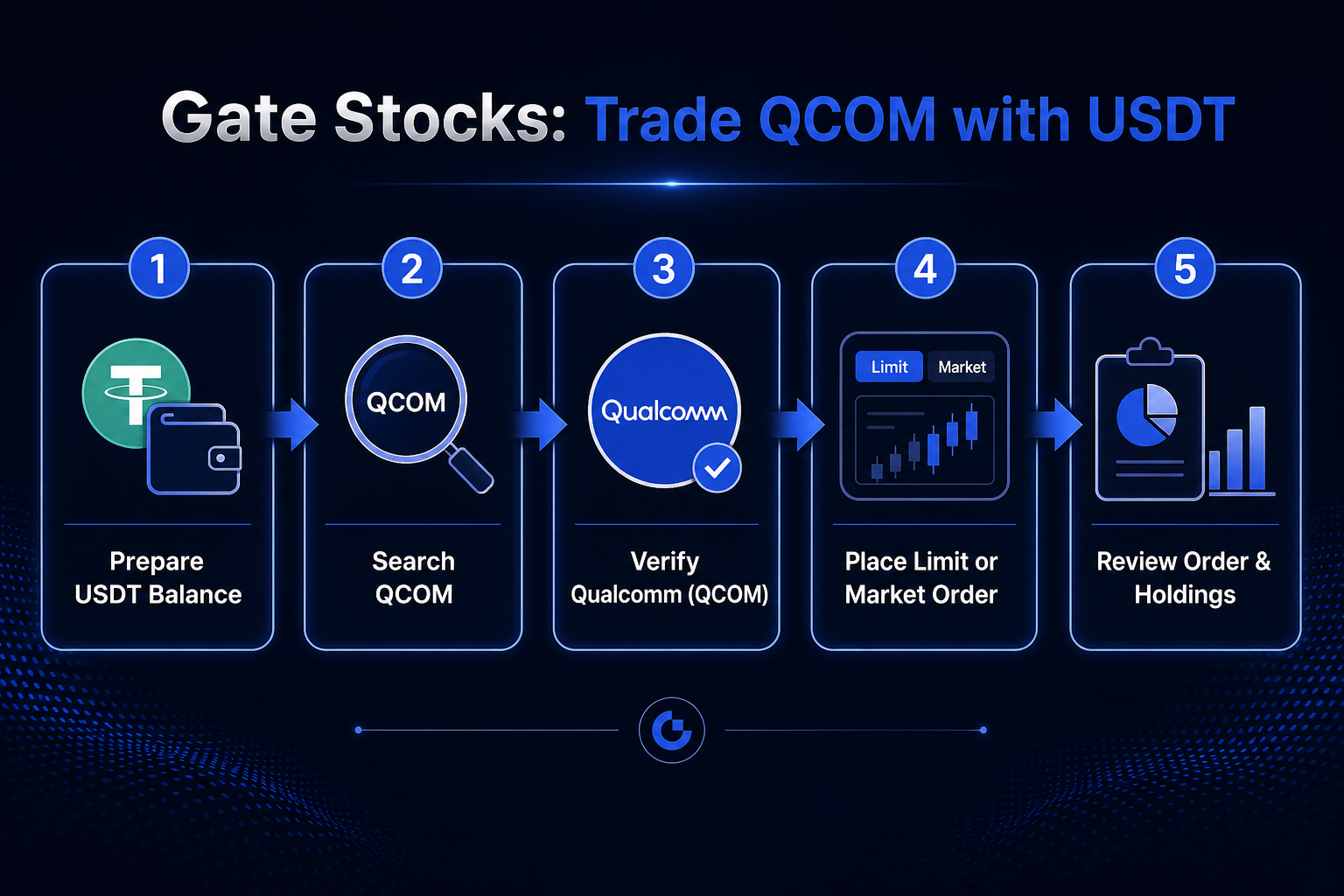 Figure 1. Gate Stocks USDT-to-QCOM flow: prepare funds, search ticker, verify entity, place order, and review.
Three categories of preparation are required before trading: account and product permissions, available USDT balance, and basic identification of the QCOM instrument. Permissions answer whether Gate Stocks stock orders can be submitted; funding answers whether enough USDT is available; instrument identification answers whether the target is Qualcomm Incorporated rather than a similarly named entity.
A common mistake in preparation is treating “already read QCOM business materials” as equivalent to “ready to place an order.” Company research belongs to the understanding layer; account status and funding belong to the execution layer. Only when both are satisfied should search and quote verification begin.
| Preparation item |
What to confirm |
Purpose |
| Account permissions |
Whether Gate Stocks stock trading is available |
Avoid attempting orders when the feature is unavailable |
| Funding |
Whether available USDT is sufficient |
Avoid submission failures due to insufficient balance |
| Instrument |
Whether the ticker is QCOM and the company name matches |
Avoid wrong ticker or entity selection |
| Rules |
Order type, trading hours, fee display |
Avoid execution that does not match expectations |
USDT preparation is best done in two steps: confirm the balance is visible in the funding account, then confirm that balance can be used for stock trading. In some cases total balance exists, but available balance, frozen amounts, or product permissions may block order entry; rely on actual page fields to reduce execution errors.
How to Access Gate Stocks and Open the Qualcomm (QCOM) Page?
After entering Gate Stocks, enter ticker QCOM in the search box. Search results must show the full company name as Qualcomm Incorporated (or the equivalent legal name shown on the page), and the current page must belong to the Stocks product—not contracts or other categories.
The most direct entry is the Gate QCOM stock page. After opening it, verify ticker, company name, and market attributes before entering the quote and order areas; do not fill quantity and price before confirming the entity.
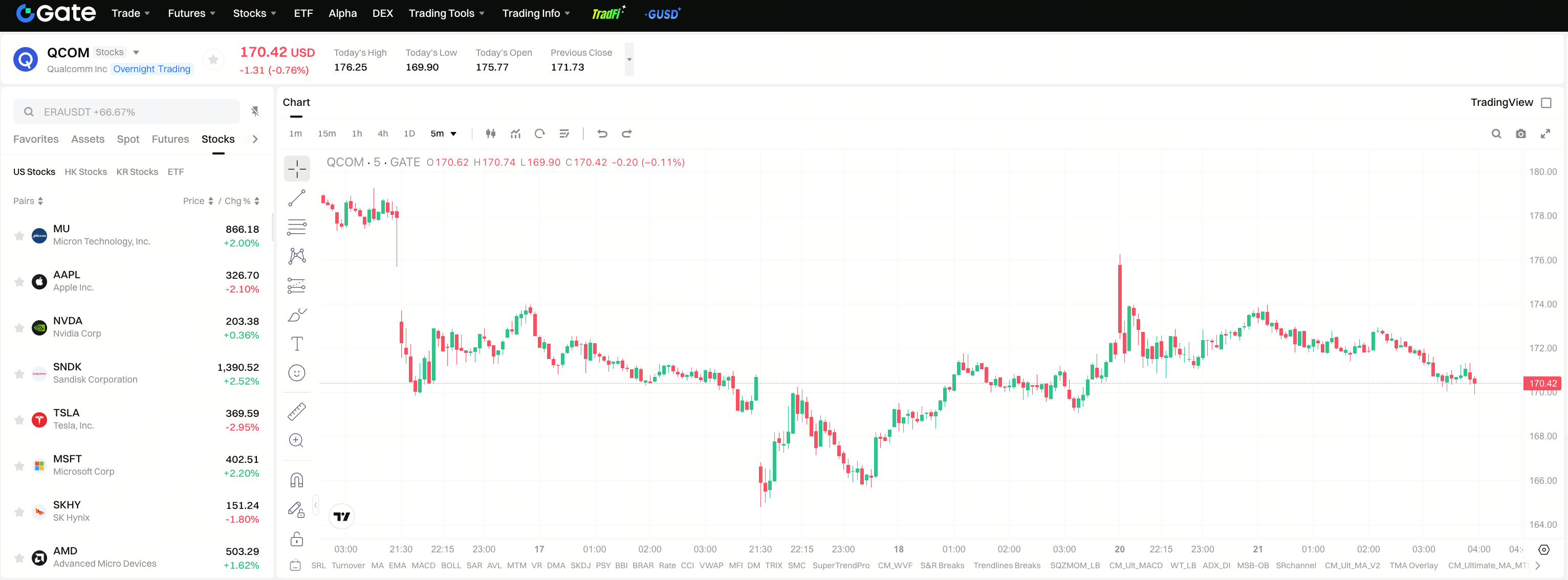
Search must satisfy three checks: ticker is QCOM, company name is Qualcomm Incorporated, and the page belongs to Gate Stocks stock products. If any one is missing, do not continue filling the order.
What to Check in Quotes, Order Book, and Order Fields?
On the QCOM quote page, current price, change percentage, volume, and the order book or equivalent depth information are usually visible. Layout may vary slightly, but the review logic is the same: read price and liquidity first, then order form fields.
The quote area shows the current tradable price range and volatility; the order book (if displayed) shows short-term resting order distribution and helps set Limit prices; order fields directly determine whether the system accepts the order. Common fields include: buy/sell direction, order type (Limit / Market), quantity (shares or platform-equivalent units), Limit price (for limit orders), time in force, and fee or estimated cost display.
| Area / field |
What to observe |
Relation to order entry |
| Current price / change |
Current quote and volatility |
Helps set Limit price |
| Order book |
Resting price and quantity distribution |
Observes short-term liquidity |
| Direction |
Buy / Sell |
Determines add or reduce position |
| Order type |
Limit / Market |
Determines price constraint |
| Quantity |
Shares or platform units |
Determines order size |
| Fee display |
Trading costs shown on page |
Affects understanding of actual execution cost |
Field meanings follow the current Gate Stocks page; external tutorials or traditional broker UI habits cannot replace platform labels. When reading fields, confirm each item top to bottom rather than filling everything at once and checking afterward.
What Is the Full Limit / Market Order Flow?
Whether Limit or Market is chosen, QCOM stock orders can follow the same sequence: confirm direction → select order type → enter quantity → enter price (limit orders) → read fee notices → submit → review order and holdings.
Limit orders require a maximum buy price or minimum sell price; if price conditions are not met, the order may remain unfilled.Market orders match at the best available price as quickly as possible without guaranteeing a specific fill price; in volatile or thin markets, the execution price may differ from the quote area display.
Limit buy: select Buy → Limit → enter share count and limit price → confirm sufficient USDT → submit → check fill status in the order list. Market buy: select Market → enter quantity → read slippage notices → submit → verify actual fill price and fees.
After submission, return to orders and holdings to confirm status, filled quantity, and QCOM position match expectations; platform execution records on the page are authoritative.
What Differences Should Be Noted Compared to Spot Crypto Trading?
Gate users often use both spot crypto and Gate Stocks; the two differ in instrument type, pricing denomination, trading hours, and order rules—spot experience should not be applied directly.
| Dimension |
Spot crypto (typical) |
Gate Stocks QCOM trading |
| Instrument |
On-chain or platform-listed crypto assets |
NASDAQ-listed stock QCOM |
| Symbol |
Token ticker (e.g., BTC, ETH) |
Stock ticker QCOM |
| Trading hours |
Often 24/7 |
US market hours as shown on Gate Stocks page |
| Quantity unit |
Token amount |
Shares or platform-equivalent units |
| Entity verification |
Contract address / chain |
Legal name Qualcomm Incorporated |
| Research focus |
On-chain mechanics, liquidity |
Earnings, industry cycles, patents, competition |
Gate Stocks provides a stock trading path under platform rules; QCOM still represents publicly traded equity, not an on-chain token. Whether spot USDT balance can be used directly for stock orders follows page prompts.
Pre-Order Checklist (Balance, Share Count, Order Type, Risk Notices, etc.)
Before submitting, use Figure 2 to check each item: available USDT, ticker QCOM and Qualcomm Incorporated entity, Limit / Market type, quantity and limit price, trading hours, fee display, and post-submit order and holdings status.
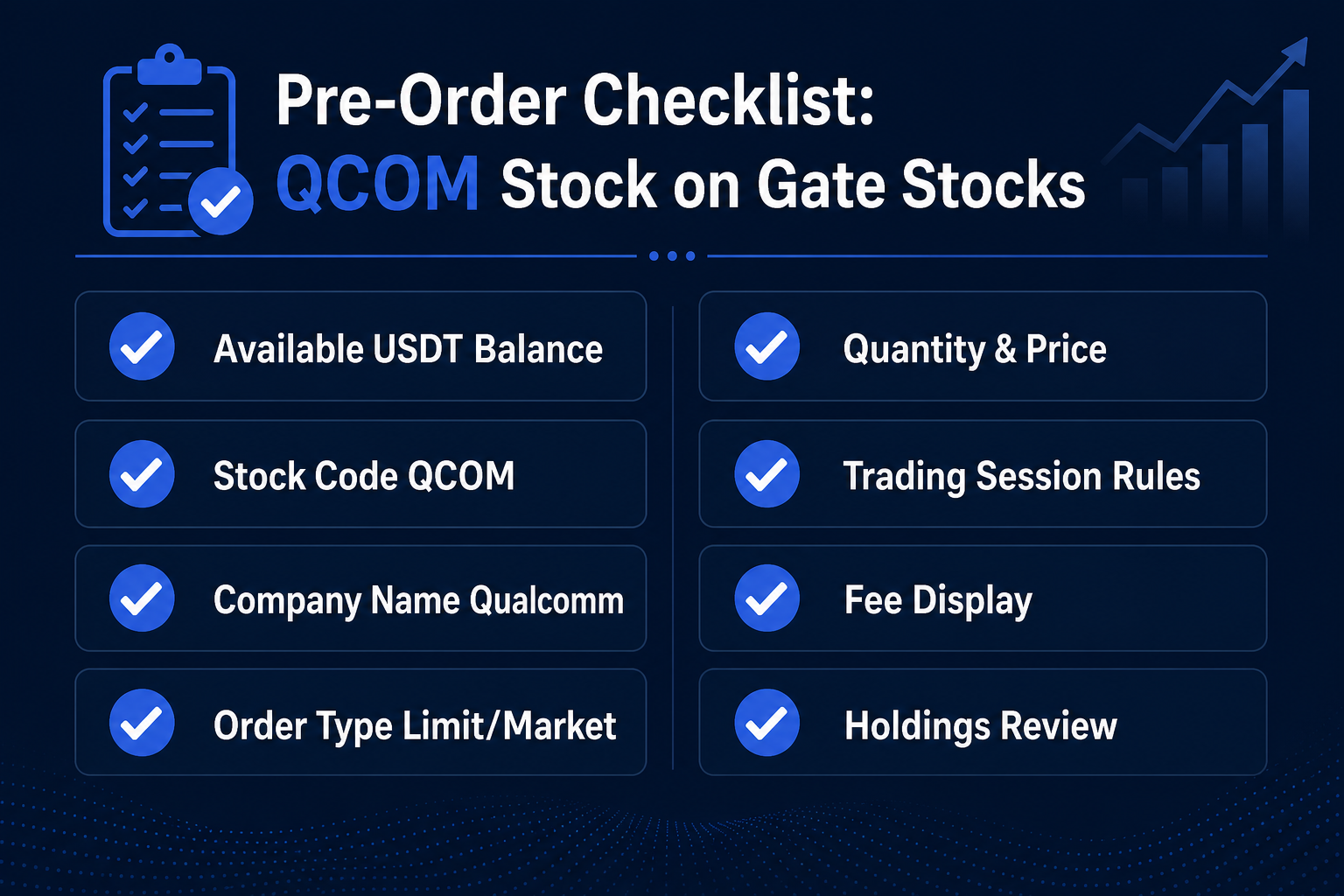 Figure 2. Pre-order checklist for QCOM stock: balance, ticker, order type, quantity, and holdings review.
Risk notices (mechanism-level, not investment advice) include: semiconductor demand cycle volatility, unfilled Limit orders or Market slippage, session limits causing order rejection, and mismatch between available USDT and page-displayed balances. These factors may affect execution outcomes; they do not constitute buy or sell judgments.
Summary
Trading Qualcomm (QCOM) stock with USDT on Gate Stocks follows: prepare permissions and available USDT → search and confirm QCOM entity → read quotes and order fields → submit under Limit or Market rules → review orders and holdings with the checklist. Company research and platform execution should always stay separate; confirming instrument and fields before discussing industry and earnings is usually more reliable than reversing that order.
The flow can be compressed to one check phrase: confirm QCOM first, then order type, then fills and holdings. All three steps complete the loop for a single trade.
FAQ
Can You Buy US Stock Qualcomm on a Crypto Exchange?
Gate Stocks supports trading Qualcomm (QCOM) stock listed on public markets under the rules shown on the platform page. Whether orders can be placed, available sessions, and order types follow the current Gate Stocks display; spot crypto product availability cannot be assumed to equal stock product permissions.
Can You Buy US Stock Qualcomm with USDT?
In Gate Stocks, QCOM stock trading typically uses USDT as one funding denomination. Actual available balance, freeze rules, and order thresholds follow trading and funding page fields; external experience cannot replace page prompts.
QCOM is the stock ticker for Qualcomm Incorporated, listed on NASDAQ. On Gate Stocks, search by ticker QCOM to open the corresponding page and verify the legal company name.
What Company Is Qualcomm (QCOM)?
Qualcomm is a semiconductor company centered on Snapdragon mobile chips, wireless connectivity technology, and patent licensing; QCOM is its NASDAQ-listed stock ticker. Business structure, compute roles, and risk framing are covered in the QCOM stock overview.
What Is the Difference Between Limit and Market Orders?
Limit orders require a price boundary and may remain unfilled if price is not reached; Market orders prioritize speed of execution, and fill price moves with the market and may differ from the quote area display. The choice depends on the trade-off between price control and execution timing; rules follow the Gate Stocks page.