Author: Changan I Biteye Content Team
Last year, I kept an eye on Polymarket every day, manually following trades whenever I saw unusual activity. Once, I noticed a new wallet making a large purchase, checked the news, analyzed the logic, and prepared to place an order — it took about twenty minutes. By the time I returned to the trading page, the price had already skyrocketed.
That feeling of “seeing the opportunity but missing the profit” made me realize: in the 2026 prediction markets, the gap isn’t in information but in tools.
The cognitive barrier to cross-market trading is extremely high. Retail traders find it difficult to analyze and react quickly amid rapidly changing news. This article will guide you from installation to practical use, teaching you how to build your own automated trading system for Polymarket.
1. Key Points Before Deployment and Underlying Configuration
Before starting, you need to install OpenClaw.
There are many tutorials available online, so I won’t repeat them here. The Biteye team has compiled a minimal deployment guide, summarizing six mainstream solutions, evaluated across ease of installation, functionality, cost, and security. It helps you choose the right plan based on your budget and technical level, including how to select an LLM:
💡OpenClaw Minimal Deployment Collection | Set up in as fast as 1 minute, beginner-friendly tutorial
After installation, there are three details to pay attention to before trading:
1️⃣ Runtime Environment: Prioritize Stability
Many focus on low latency, but in AI automated trading, environment stability is more important than speed. It’s recommended to use a cloud VPS (Tencent Cloud Lighthouse or overseas nodes are fine), rather than a local PC.
2️⃣ Security Measures: Asset Isolation and Minimal Permissions
Trading requires API keys and seed phrases. Always use a separate small wallet for automation, never expose your main wallet to scripts. When configuring API, only enable trading permissions; deposit/withdrawal rights should be strictly disabled.
3️⃣ Strategy Focus: Clarify Your Trading Direction
OpenClaw is very capable of processing information, but if it’s set to monitor every market, efficiency drops, tokens are wasted, and you may miss truly important signals.
Before getting started, identify your main battlefield. Markets on Polymarket roughly fall into categories: political events, cryptocurrencies, sports, culture… Each has its own trading logic. Start with the area you’re most familiar with and where your information sources are most reliable.
Set up a keyword whitelist in OpenClaw to focus it only on your preferred sectors. Fewer signals but more accurate are better than many signals with noise.
2. Core Functions of OpenClaw: Using PolyClaw as an Example
First, let’s describe the daily routine of an ordinary Polymarket trader before OpenClaw:
- Daily browsing Twitter, Telegram channels to see what markets everyone is watching
- Monitoring smart money, large buys, new wallets
- When signals appear, making judgments based on news and fundamentals
This process has a fatal flaw: it’s slow. By the time you see signals, gather info, and make a decision, the best entry point may have already passed. There’s an open-source project on GitHub called PolyClaw, designed specifically for OpenClaw, to analyze and trade on Polymarket.
PolyClaw is a skill for OpenClaw. Installing PolyClaw enables OpenClaw to 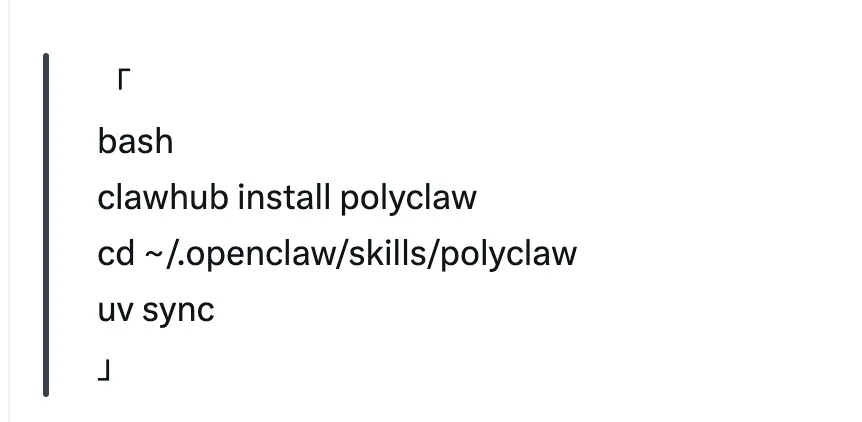
Here’s an example skill set for prediction markets like crayfish:
1️⃣ Detect Opportunities
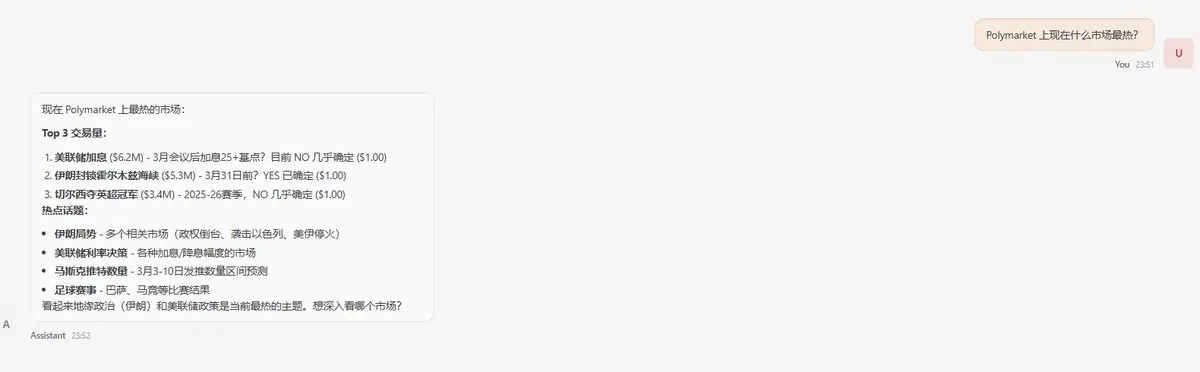
“Which markets on Polymarket are hottest right now?”
“Find all markets related to the Federal Reserve.”
PolyClaw will return market IDs, current odds, 24-hour trading volume, helping you quickly identify what events everyone is focusing on.
2️⃣ Detect Hedging Opportunities
This is one of PolyClaw’s most interesting features.
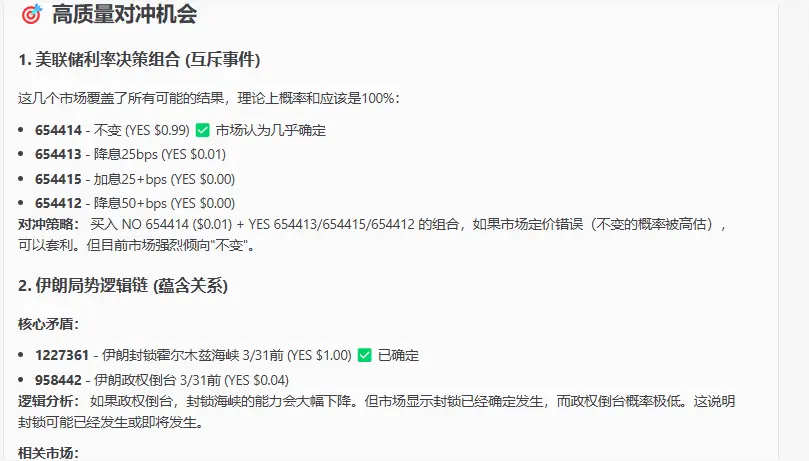
It uses AI to scan multiple markets for logical overlaps. For example, if Market A’s YES outcome is confirmed, then Market B’s NO outcome is almost certain.
Real example:
Market A: “New Supreme Leader of Iran by…?” → If announced before this date, it’s YES
Market B: “Iran announces new Supreme Leader on…?” → Only on that day does it count as YES
The connection: if B is YES, then A must also be YES. PolyClaw can automatically identify such relationships and rate them:
T1 (≥95%): Near riskless arbitrage
T2 (90-95%): Very low risk
T3 (85-90%): Some risk, cautious reference
Initially, I didn’t quite understand this feature until I compared it with the Iran example. Turns out, logical relationships can be used this way.
3️⃣ LP Automation: Placing Orders for Rewards and Interval Rebalancing
Many don’t realize that placing limit orders on Polymarket can earn rewards. The platform distributes daily rewards to liquidity providers, and besides official rewards, users can add extra LP incentives, making some markets particularly lucrative.
However, LP involves a common hassle: daily “clocking in.” Rewards are distributed every morning at 8 AM. After receiving rewards, users might withdraw their added incentives, causing the reward structure to change at any time. This means yesterday’s optimal interval might no longer be so today, requiring re-evaluation and re-placing orders.
Two other daily frustrations:
Pain Point 1: Monitoring orders to prevent execution
If your order gets filled, liquidity drops, and so do rewards. Many LPs spend a lot of time watching their orders, checking if they’ve been filled, and whether to add more.
Sometimes, during sleep, a sudden news event causes only one side of an LP order to execute, leading to automatic losses and less profit than the loss incurred.
Pain Point 2: Deciding which market to LP
PM has a dedicated LP interface showing rewards per market. But the problem is: rewards, competition, and price ranges are constantly changing.
You need to monitor rewards and spreads daily, re-evaluate which markets are worth LPing, which is time-consuming.
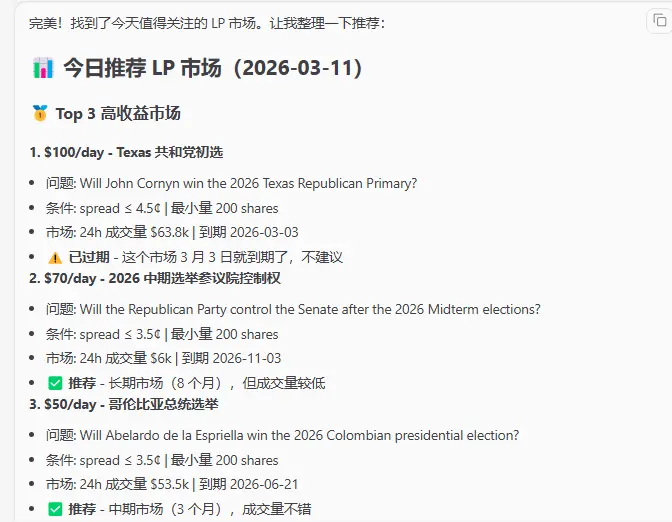
To address this, I developed a Skill that allows OpenClaw to handle these repetitive tasks:
1️⃣ Automatically analyze LP interface data daily, filtering markets based on reward size, spread, and price range, saving manual effort.
2️⃣ Monitor open orders in real-time, and if an order is filled, automatically rebalance within the optimal range without your constant attention.
3️⃣ After daily reward distribution, automatically reassess strategies and adjust order intervals based on the latest reward structure, eliminating manual “clocking in.”
Once, I had to wake up at 8 AM daily to re-place orders. After using OpenClaw to automate this, I realized it’s not necessary to be so exhausted.
3. Risk Identification and Control Measures in Automated Trading
Automated trading can help you execute faster, but speed also means losses can accumulate quickly when errors occur.
When I was doing cross-market arbitrage, I encountered two pitfalls:
Both markets placed orders simultaneously; one filled, but the other didn’t due to insufficient liquidity. The result was a unilateral exposure, and hedging failed.
Later, I realized this wasn’t the worst. The program kept re-evaluating signals, triggering multiple times, leading to mismatched positions and bigger losses than manual trading.
This isn’t an isolated case. On March 8, 2026, during the US Eastern Daylight Time switch, Polymarket’s BTC UP or DOWN market had a bug: the market, which should have run from 1 am to 2 am, was skipped over due to the time change, and both API and frontend showed it as 1 am to 1 am.
This data was logically impossible, but many automated programs read the end time to determine trading windows. As a result, they executed based on incorrect data, causing the author, @richrichardoz, to lose $100,000.
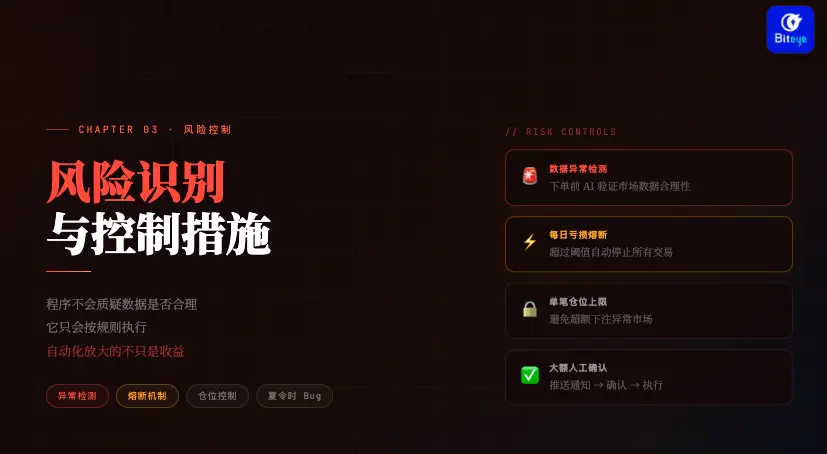
Automation amplifies not only gains but also risks. Programs don’t question data validity; they just follow rules. When data sources are faulty, losses can come faster than manual trading. You can set up several safety measures in OpenClaw:
Data anomaly detection: Before placing orders, AI verifies whether market data is reasonable; if anomalies are detected, skip trading.
Single-trade position limit: Set a maximum amount per trade to prevent overexposure in abnormal markets.
Daily loss circuit breaker: If losses exceed a threshold in a day, OpenClaw automatically halts all trading until manual review.
Manual confirmation before placing large orders: For big trades, OpenClaw can send you a notification for approval before executing.
Many such cases exist. It’s recommended to test strategies with small funds before deploying real capital, ensuring the program can operate normally under various conditions, then gradually increase positions.
4. Summary: Survival Rules for 2026 Prediction Markets
OpenClaw accelerates the processes of information gathering, judgment, and execution. This article focuses on information and decision-making; the next will cover trade execution.
Tools themselves don’t generate profits; real gains come from your strategic thinking. Crayfish just frees you from tedious chores, allowing you to focus on identifying “high-probability events.”


